
If you are a Sky Mobile customer, you may be able to fund your casino account using Pay by Mobile, with the deposit added to your phone bill. It is quick and means you do not need to share card details. Here is how pay by phone bill works with Sky Mobile, how to deposit at Wizard Slots and what to check first.
Spellbook contents
- How does pay by phone bill work?
- How to deposit with Sky Mobile
- Things to check first
- Is pay by phone bill a good idea?
- Play responsibly
- Sky Mobile plans and phone payments
- Phone bill deposit limits explained
- Pros and cons of paying with Sky Mobile
- Keeping track of phone bill spending
- Sky Mobile pay by phone FAQs
01 How does pay by phone bill work?
Pay by Mobile lets you make a deposit using your mobile number instead of a card. The payment is processed through your network, so the amount is added to your monthly bill or taken from your credit, depending on your plan. You confirm each payment, usually with a text message code.
Whether you can use it with Sky Mobile depends on your account settings and your network's rules for this type of payment. If a payment is declined, check with Sky Mobile that third party or premium payments are allowed on your account.
Pay by Mobile at Wizard Slots
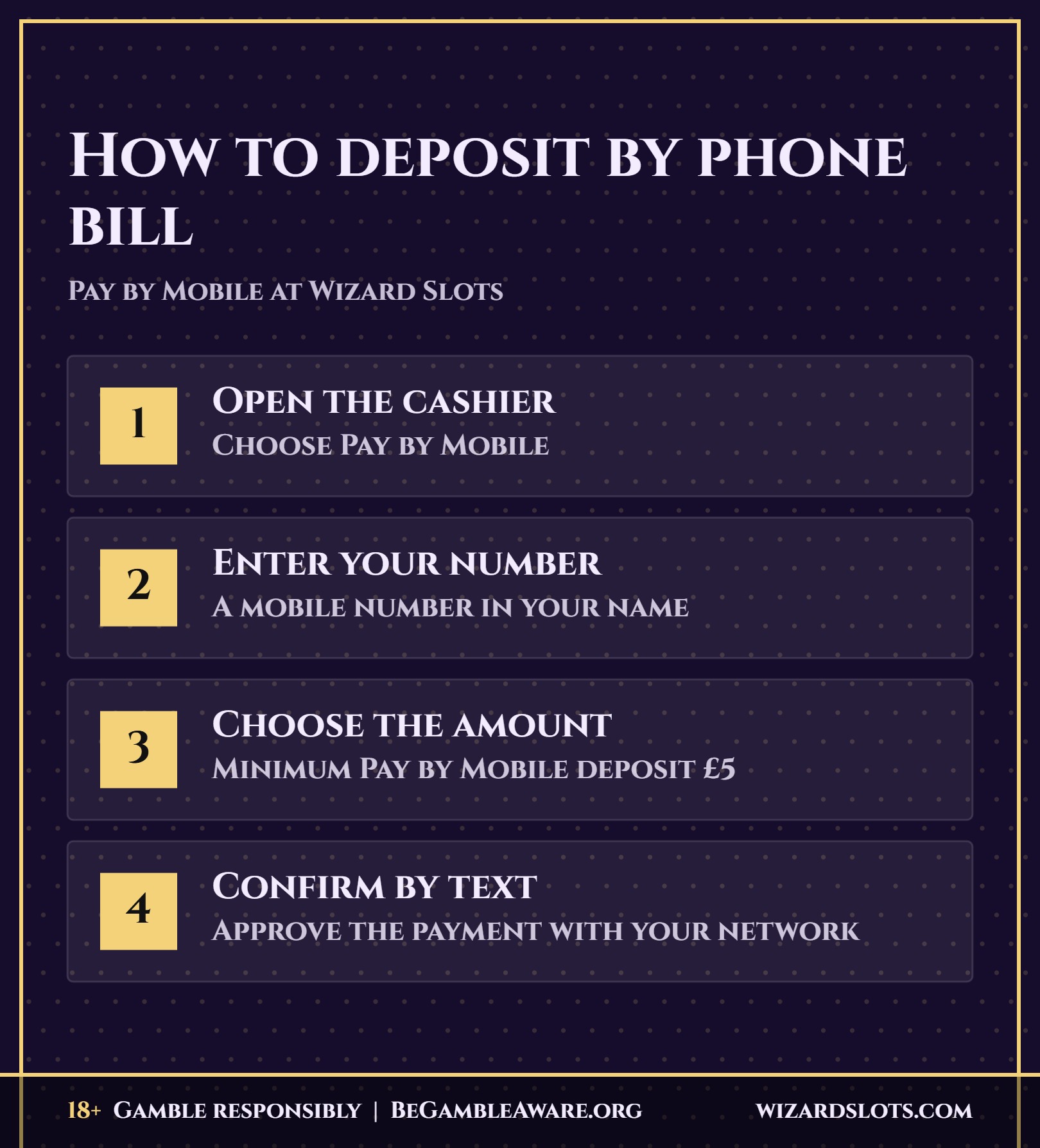
02 How to deposit with Sky Mobile
Chapter 1 Log in to Wizard Slots
Sign up first if you do not have an account.
Chapter 2 Open the cashier
Choose Pay by Mobile as your payment method.
Chapter 3 Enter your number
Use the Sky Mobile number registered in your name.
Chapter 4 Choose the amount
The minimum Pay by Mobile deposit is £5.
Chapter 5 Confirm by text
Follow the instructions in the text from your network to approve the payment.
03 Things to check first
- Your network may set daily or monthly limits for this type of payment
- Some plans block third party payments by default
- You will need a different method, such as a debit card or PayPal, to withdraw
- The payment must be from a number in your own name
Our pay by mobile casino page explains the method in full, and pay by phone casino covers other networks.
04 Is pay by phone bill a good idea?
It is convenient, and keeping deposits small can help you stay in control. But adding gambling to a monthly bill can make spending harder to track. Set a deposit limit before you start and check your bill regularly.
05 Play responsibly
Only deposit what you can afford to lose. Use our safer gambling tools to set deposit limits, take a break or self exclude. 18+ only.
06 Sky Mobile plans and phone payments
How a Pay by Mobile deposit is charged depends on your Sky Mobile plan. On a monthly plan, deposits are usually added to your next bill. Some accounts have spending caps or block third party charges, which can stop a deposit going through.
Monthly bill
The deposit usually appears on your next Sky Mobile bill.
Your own number
The number must be registered in your name.
Spending caps
A cap on your account may block extra charges.
Third party charges
These need to be allowed on your account.
07 Phone bill deposit limits explained
Mobile networks and payment providers usually set limits on how much can be charged to a phone bill in a day and a month. These limits are separate from any deposit limits you set in your Wizard Slots account. If you reach a network limit, you can use another method, such as a debit card or PayPal, from £10.
Network limit
Who sets it: Your mobile network or payment provider
What it does: Caps phone bill charges over a period
Account deposit limit
Who sets it: You, in your Wizard Slots account
What it does: Caps how much you can deposit
Minimum deposit
Who sets it: Wizard Slots
What it does: £5 with Pay by Mobile, £10 with other methods
08 Pros and cons of paying with Sky Mobile
Good to know
- No card details needed
- £5 minimum deposit
- Quick confirmation by text
- Network limits help keep deposits small
Worth checking
- You cannot withdraw to your phone bill
- Network limits may stop larger deposits
- Monthly bills can make spending harder to track
09 Keeping track of phone bill spending
Chapter 1 Set a deposit limit
Choose a daily, weekly or monthly limit in your account.
Chapter 2 Check your bill
Look for Pay by Mobile charges each month.
Chapter 3 Use your account history
See every deposit and withdrawal in one place.
Chapter 4 Take a break if needed
Time outs and self exclusion are available from your account.
10 Sky Mobile pay by phone FAQs
Q1. Can I pay by phone bill with Sky Mobile?
It depends on your account settings and your network's rules for this type of payment. Check with Sky Mobile if a payment is declined.
Q2. What is the minimum Pay by Mobile deposit at Wizard Slots?
£5. Other payment methods start at £10.
Q3. Can I withdraw to my phone bill?
No. You need another method, such as a debit card or PayPal, to withdraw.
Q4. Why was my phone bill deposit declined?
Common reasons include network spending limits or third party payments being blocked.
Q5. Is pay by phone bill safe?
Yes. You approve each payment and do not share card details.
Q6. Will a Pay by Mobile deposit show on my Sky Mobile bill?
Yes. On a monthly plan, deposits usually appear on your next bill.
Q7. Are network limits the same as my deposit limit?
No. Network limits are set by your network, while you set your own deposit limit in your account.
Q8. What can I use if I reach my phone bill limit?
Another method, such as a debit card or PayPal, from £10.
Q9. Where can I see my Pay by Mobile deposits?
In your account history and on your phone bill.
More payment guides
The information in this guide is for entertainment and education only and is not betting advice. Always gamble responsibly.